Ask any working photographer when they hit the wall, and you’ll hear the same thing:
“Wedding days often mean 10+ hours on your feet… Add editing marathons, admin, and communication, and burnout is real.” — Lauriane Vega
That line hits because it’s universal. Most photographers fall behind because they enter peak season with workflows designed for slow months.
What Is a Wedding Photography Workflow?
A wedding photography workflow is the end-to-end system you use to shoot, cull, edit, retouch, deliver, and communicate with clients.
During peak season, this workflow gets stress-tested harder than any other time of year. If your systems aren’t optimized, they break—fast.
The truth is, wedding photography has quietly evolved into a high-volume, fast-delivery industry. Photographers are delivering 2–3× more images than a decade ago, and clients have been conditioned by TikTok-speed gratification.
Sneak peeks within 24 hours? Normal. Full galleries within a week? Increasingly common. And while the artistic side of the job hasn’t changed much, the operational side absolutely has.
The wedding season doesn’t care if your systems aren’t ready.
In this article, we’ll break down the workflows, systems, automations, and client-management tactics that actually keep photographers afloat during peak wedding season.
TLDR: The peak-season wedding photography workflow blueprint
| Stage | What Happens | Peak-Season Time Target | Tools / Notes |
| 1. Import | Dual backup, card checks, folder structure applied | 10–15 min | SSD, LR/C1, consistent folder setup |
| 2. AI Culling | Aftershoot auto-culls, removes duplicates, flags issues; you review final picks | 10–20 min | Aftershoot AI Culling |
| 3. AI Editing (Base Edit) | Aftershoot applies your editing style across the full gallery | 20–30 min | Aftershoot Edit for batch-level consistency |
| 4. Lightroom Refinement | Fine-tune global adjustments | 20–30 min | Lightroom refinements & sync |
| 5. AI Retouching (Hero Shots) | Subtle skin smoothing, clean-up, flyaway fixes on key images | 5–10 min | Aftershoot Retouch on 10–20 hero shots |
| 6. Lightroom/Photoshop Touch-Ups | Final hand retouching on select portraits (only if needed) | 5–15 min | LR/PS touchups for craftsmanship |
| 7. Export + Backup | Full-resolution and social sets exported, cloud synced | 20-25 min | Cloud gallery backup |
| 8. Deliver Gallery | Upload to gallery platform+send branded email template | 10 min | Pixieset, Pic-Time, or CloudSpot |
Build Your Pre-Season Wedding Photography Workflow Systems
“Most photographers don’t use systems. They work from a place of reaction instead of being proactive.” — Joy Michelle
This is the part most photographers skip because it feels “administrative.” But this is exactly the difference between drowning and delivering consistently. Peak season exposes everything you haven’t systematized:
- The missing checklist
- The “I’ll organize my presets later” lie
- The messy backup structure
- The editing backlog that grows faster than you can clear it
The smartest photographers don’t wait. They prepare their ecosystem early so that everything runs smoothly once wedding volume spikes.
a) Clean and archive old catalogs
Peak season demands speed, and nothing slows Lightroom or Capture One faster than a year’s worth of half-finished catalogs.
- Archive last year’s weddings into dated folders
- Zip + offload them to long-term drives or cloud storage
- Make a fresh catalog for the new season
- Remove unused presets, profiles, and plugins
A clean catalog can easily save you minutes per import, and minutes become hours when multiplied by 20–30 weddings.
On the tech side, think beyond just hard drive space. One wedding photographer mentioned that he’ll even upgrade his laptop or working SSD before peak season so Lightroom isn’t crawling when he needs it most. Spinning drives might be fine in the off-season, but when he switched to SSDs, he said imports went from “10–20 minutes of waiting” to “basically instant.”
b) Set up a consistent folder architecture
Consistency beats improvisation. Create a predictable folder system so every wedding follows the same path. This removes guesswork mid-season, especially when you’re importing three weddings in one weekend and the days start to blur.
c) Run a full backup and drive health check
Peak season is the worst time to discover a failing hard drive.
- Run SMART tests on your SSDs/HDDs
- Replace anything acting suspicious (laggy transfers, weird noises, slow mounts)
- Confirm your 3–2–1 backup workflow is operational
- Rotate fresh backup drives into your system
Nothing derails a season like losing files. NOTHING.
d) Prep your memory cards and camera firmware
Before peak season, don’t just reformat cards and call it done:
- Do a proper sensor cleaning on each body. You can DIY if you’re confident, or send them in. Even if you shoot wide open and rarely see dust, it’s cheap insurance.
- Update your cameras to stable firmware. The smart approach (borrowed from the video): don’t install firmware that dropped yesterday. Wait a few months, make sure there are no horror stories, then update so small glitches are gone before you’re shooting three weekends in a row.
- Retire older cards, bring in fresh, faster ones, and label them clearly for the season.
You can use Taylor Jackson’s brilliant card system idea:
His partner shoots ~30 weddings a year and uses a labeled card box plus a spreadsheet connecting each card to a specific wedding. A card only goes back into rotation once that wedding is delivered. That’s a simple way to avoid overwriting anything mid-season.
e) Prep the night of the wedding
This is where most photographers cut corners when they’re tired and where most problems start. Do this every wedding day:
- Offload to your main SSD
- Make a clone on a backup drive
- Start a cloud upload (even if partial)
- Add a short voice note or text log with key details (ceremony lighting, issues, retouch notes)
If something goes wrong tomorrow, you don’t want to be guessing.
f) Refresh CRM, questionnaires, and email templates
Client communication is part of your workflow, whether you want it to be or not.
Before peak season hits:
- Update delivery timelines
- Refresh pre-wedding questionnaires
- Clean up canned responses
- Add auto-reminders for timelines and payments
- Refresh your welcome guide
Every template you tighten now saves you 5–10 minutes per client later, all season long.
g) Run a workflow dry-run before the season starts
Treat this like a workflow fire drill. Import a test shoot, send test emails to yourself, and time each stage to establish a realistic baseline. If anything feels slow in May, it will feel unbearable in October.
Wedding-Day workflow: Shoot with editing in mind
The fastest way to deliver a wedding is to shoot it with editing in mind. Peak season isn’t the time to be “spraying and praying” or experimenting with five different white balance philosophies in one day. The choices you make while shooting directly determine how fast (or painfully slow) your culling, editing, and retouching will be later.
Think of this as a preventative workflow. Every decision you make on the wedding day should reduce the editing workload.
a) Keep the shot-list accessible
A clean, intentional shot list keeps your workflow tight because nothing slows you down later like digging through 4,000 images trying to remember if you got “that one portrait with Grandma.”
Most wedding photographers already have a shot list… buried somewhere in their email threads or living rent-free in their heads. During peak season, that’s not enough. Your brain is juggling timelines, weather, lighting shifts, family dynamics, and logistics. Offload the mental work and print it out!
b) Maintain consistent exposure and white balance
You don’t need “perfect” exposure on every frame. You need consistent exposure. Consistency is what makes batch editing work.
A few on-the-day habits that save hours later:
- Meter the same way for similar scenes
- Lock in Kelvin for indoor locations instead of relying on Auto WB
- Use exposure compensation instead of constantly shifting ISO/shutter combos
- Make a quick test shot when the light changes drastically
c) Shoot intentionally (not excessively)
The biggest culling problems start on the wedding day. If you’re firing 15 frames per second during quiet moments, you’re just simply creating more work. Burst intentionally for:
- First kiss
- Sparkler exits
- Entrance moments
- Confetti/flower tosses
For everything else, shoot with purpose. AI can remove duplicates and blurs when you start with your post-production workflow
d) Capture light anchors throughout the day
A light anchor is a deliberately taken frame that helps your editing stay consistent across huge timeline shifts.
Examples:
- One clean shot of the bride near a window before makeup starts
- A neutral exposure during golden hour
- One flash-lit frame at the reception with the exact setup you want
e) Use editing-friendly lighting choices
Every time you choose lighting that’s chaotic or inconsistent, you’re adding time to your edit stack.
Peak-season-friendly lighting decisions:
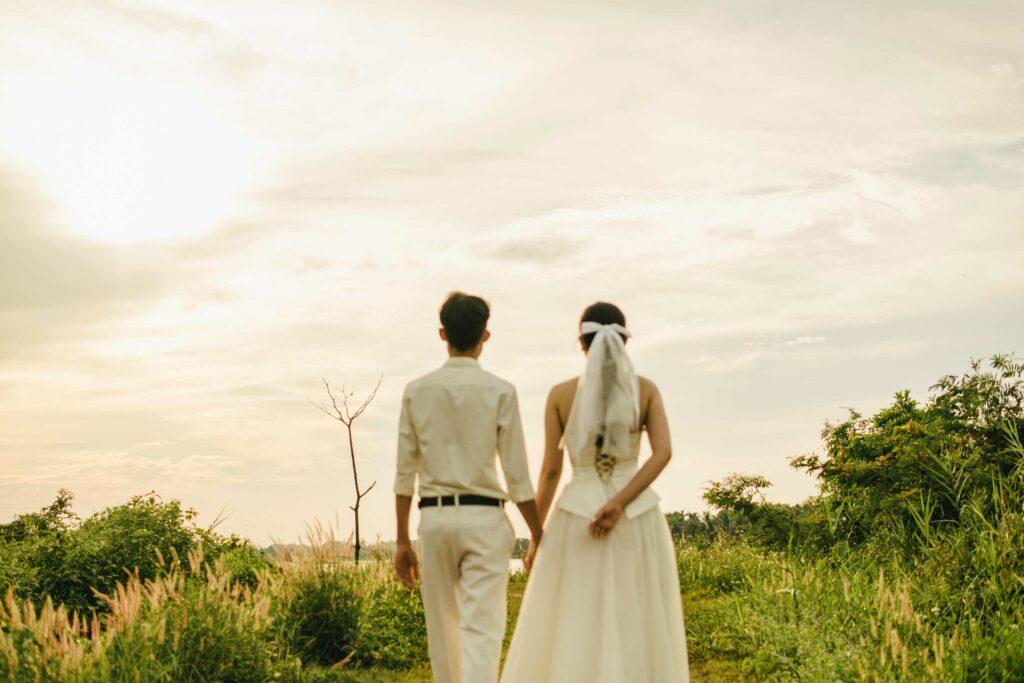
- Slight backlight for outdoor wedding portraits (better skin tones + easier color grading)
- Bounce flash indoors when possible for smoother tones
- Avoid mixing heavy tungsten and daylight unless you want to fix WB manually later
- Use the same flash power/settings for all formal groups
f) Tag must-keep moments
This small habit dramatically speeds up culling and retouching later. Use in-camera ratings or favorites to mark:
- Album-worthy portraits
- Emotional moments (hugs, tears, laughs)
- Key family shots
- Anything with great light or great expressions
When you get to culling, these tagged images rise to the top, and they’re usually the ones you’ll retouch later for extra polish.
g) Think like an editor while shooting
The best peak-season photographers shoot with the final gallery in mind.
- Avoid shooting dozens of inconsistent angles for the same moment
- Keep your compositions clean. Less junk to clone or heal later
- Pay attention to backgrounds to reduce retouching
- Notice harsh shadows early instead of trying to “fix it later.”
The more intentional your shooting, the smoother your editing workflow becomes.
How to streamline post-production during peak wedding season
Your culling and editing workflow is the engine that determines whether you glide through peak season or spend September buried under deadlines. Let’s build you a production workflow that behaves the same every time: predictable, fast, and strong enough to survive 10–20 weddings without breaking.
Use AI to reduce culling time
If you want to survive peak season without drowning in backlogs, automate culling. It’s the highest time cost with the least creative return.
Most photographers massively underestimate the drag culling wedding photos create during peak season. Photographers across communities say the same thing:
“I shot a triple-header weekend, and I’m still culling the first wedding.”
“It’s the culling that burns me out, not editing.”
Now we know what you’re thinking. Should you use AI in your workflow?
Absolutely.
Here’s the thing: AI isn’t replacing your judgment. When you’re shooting 2,000–5,000 frames per wedding, manually sorting duplicates or closed eyes isn’t “artistic control.” It’s a bandwidth drain.
Aftershoot’s AI culling is built for exactly this volume-heavy reality:
- It removes duplicates so you’re no longer choosing between five nearly identical bridal portraits.
- It flags blinks and out-of-focus frames automatically, saving you hundreds of micro-decisions.
- It learns your selection patterns and improves as you use it.
- It handles massive weddings without choking your machine or slowing your catalog.
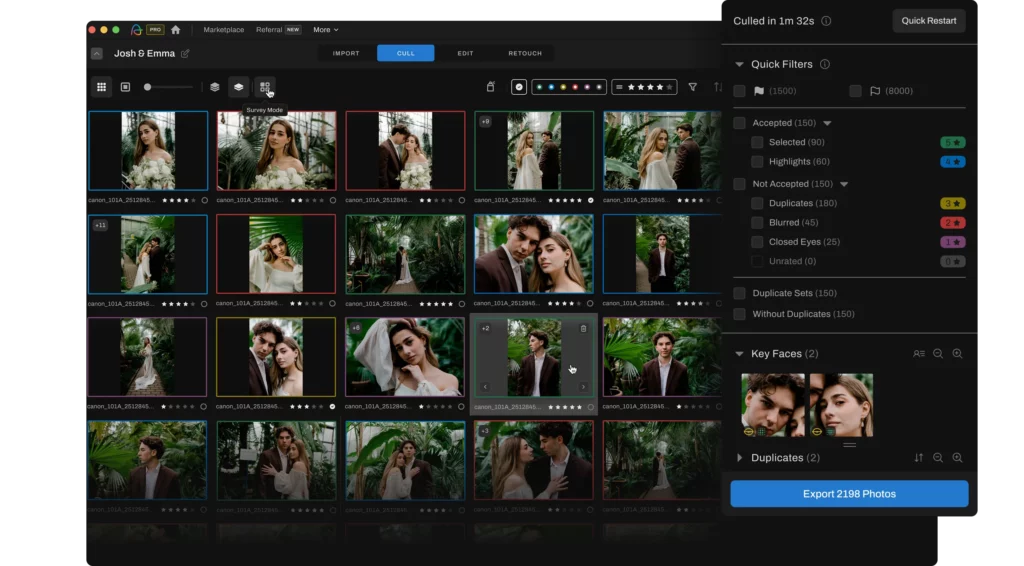
Most photographers who switch to AI culling are doing it because peak season demands a workflow that doesn’t collapse under volume. Instead of culling one wedding while shooting three more, you’re clearing your backlog the same night you shoot or the morning after without sacrificing quality.
For most wedding photographers, manual culling takes 2–4 hours per wedding, while Aftershoot AI culling takes 10–20 minutes total review time
Multiply that across a 15–25 wedding season, and you’re reclaiming dozens of hours. That’s time you can use to do your creative edits or simply not work past midnight on a Wednesday.
“Since switching to Aftershoot, my wedding photo culling time has dropped dramatically. What used to take me 3–4 hours now often takes less than 30 minutes and that includes the time I spend refining my final selection” — Paul Waring, wedding photographer
Build a consistent editing workflow you can scale
A peak-season wedding editing workflow only works if it’s consistent. You can’t reinvent your look every weekend, not when you’re shooting back-to-back weddings for three months straight.
Most photographers struggle during this season because editing is repetitive. Fixing exposure across 800 reception images is not creative work. Correcting white balance on every family grouping isn’t creative work. Rebuilding the same look with your presets for the 20th wedding in a row? Definitely not creative work.
That’s where AI steps in to apply your style consistently across hundreds or thousands of images, so you start the edit already 70% done.
Aftershoot’s AI editing helps you:
- Apply your editing style (based on your past edits) or create an Instant AI profile with your Lr presets to apply your style instantly across a gallery
- Normalizes exposure across wildly different lighting conditions
- AI mask, crop, and straighten based on your needs
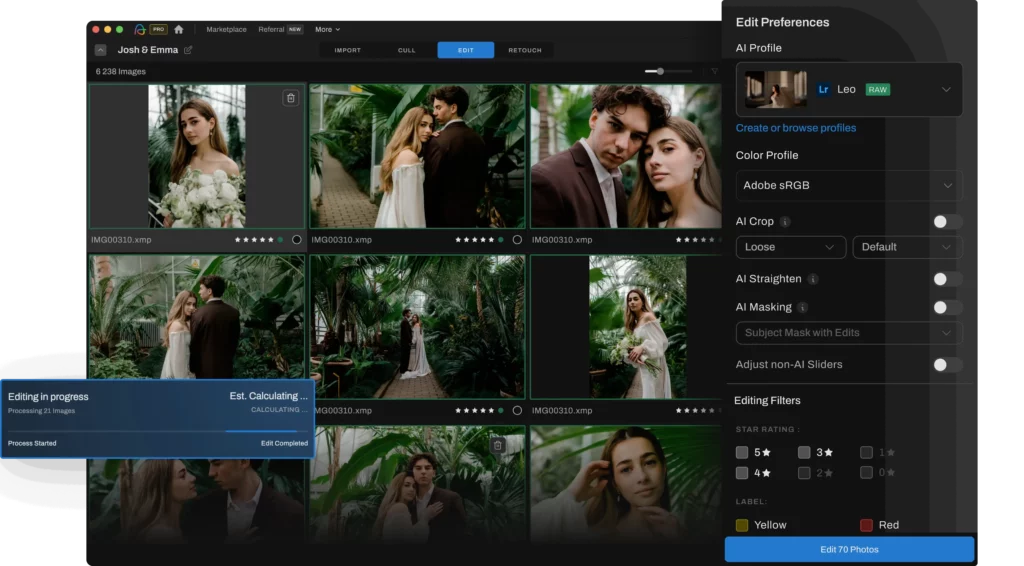
It gives you a fully edited gallery you can refine inside Lightroom. Think of it as your first-pass editor: one that doesn’t get tired, inconsistent, or overwhelmed during peak season.
This hybrid approach keeps your artistic fingerprint where it matters most, while removing the time sinks that slow photographers down during peak season.
Retouch only the hero shots (AI Assisted)
Wedding photographers don’t need every image retouched. But they need the important ones retouched well. Hero shots, album selects, and key portraits deserve extra attention, and AI retouching gives you a clean, consistent baseline without outsourcing or sinking hours into Photoshop.
Most photographers already know this truth: clients judge your work by 10–15 images, not the entire 600-image gallery. Those are the photos that get shared, framed, printed, and most importantly, talked about. If you want clients to rave about you and recommend you, you need those hero moments to look intentional and polished.
Aftershoot’s AI retouching helps you:
- Remove skin blemishes, acne, hair flyaways, or objects from the background instantly
- Retouch individuals or groups that adapt edits by age and gender
- Achieve natural, consistent portraits
- Sync and batch retouch across your hero shots
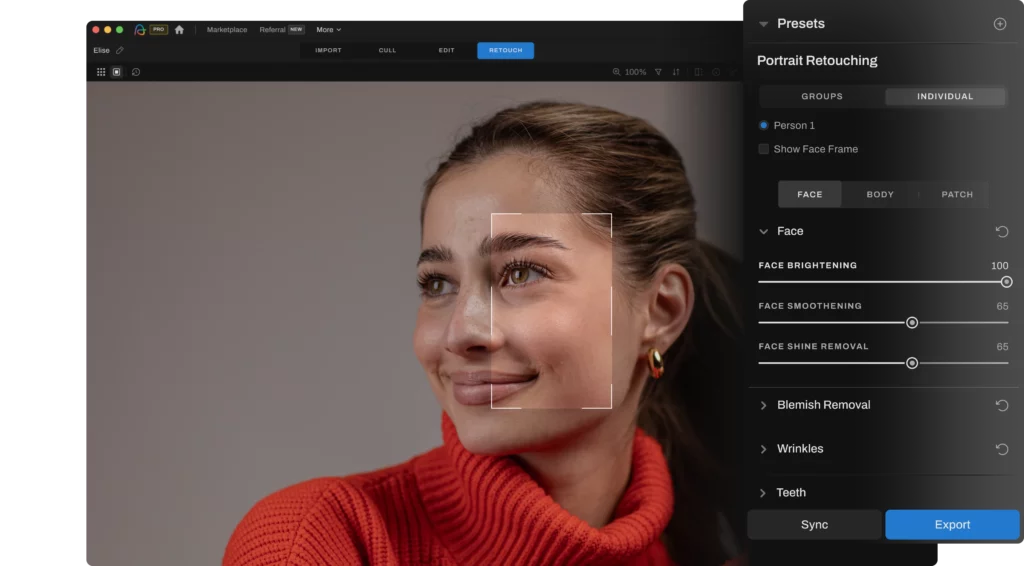
You can use it on couple portraits, getting-ready close-ups, family photos, or ceremony and reception portraits in tricky light. The goal is to elevate the moments your clients will treasure most.
Try Aftershoot for free. 30 days on us!
How to stay on top of client communication during peak wedding season
Clear communication is its own form of workflow optimization, and during peak season, it prevents 90% of the chaos photographers deal with: constant “When will we get our photos?” DMs, last-minute timeline changes, and misunderstandings about sneak peeks or delivery windows. So…
a) Set expectations before the season starts
The biggest time-waster is explaining, again and again, what clients should expect. Most of these conversations should happen once, not 40 times.
Before peak season kicks in, update:
- Your wedding guide (prep tips, outfits, timelines)
- Your delivery timeline templates
- Your “What to expect after your wedding” email
- Your FAQ section
- Your CRM automations
b) Automate the messages you repeat every season
Your CRM should be doing most of the talking for you.
Create or update automations for:
- Wedding-week reminders
- Post-wedding thank-you note
- Delivery timeline updates
- Album/print ordering reminders
- Gallery expiration notices
- Review + referral requests
Peak season is the wrong time to rely on memory.
c) Send questionnaires early
The more you know ahead of time, the fewer surprises derail your workflow. Ask about:
- Family groupings
- Sensitive family situations
- Must-have shots
- Timeline shifts
- Lighting restrictions
- Cultural moments they don’t want missed
These details reduce the amount of culling and retouching later because you’re shooting with clarity from the start.
Pro tip: Photographer, Taylor Jackson, said he used to send them four weeks before the wedding, but now sends them 3–4 months in advance. That way, information starts trickling in early, whether it’s venues, locations, or timelines, and he can mentally map his season.
He also mentioned getting phone notifications as questionnaires come back, which helps him see at a glance where he’ll be on which day, so he can plan life things like his daughter’s birthday around wedding days.
d) Keep clients updated without sacrificing focus
You don’t need to be available 24/7 to deliver a good client experience. But if you keep clients in the loop, they’d always understand.
We know you’d like to speak your mind…

But this keeps you professional and still in the game:
“I’m currently in work mode, so my response time may be slightly longer than usual. I’m focused on delivering your gallery as quickly and beautifully as possible. I’ll get back to you within X hours.”
Prepare your wedding photography workflow for what’s coming
Peak season doesn’t care how talented you are. It doesn’t care about your presets, your lens lineup, or how beautifully you shoot in golden hour. It only cares about whether your workflow can keep up with the volume, the deadlines, and the emotional load of delivering weddings week after week.
Photographers who thrive in peak season are the ones who build systems that do the heavy lifting for them. When your workflow is clean, predictable, and optimized, everything else falls into place
And when you pair those systems with the right tools, especially AI tools like Aftershoot that eliminate the repetitive work you give yourself the space to stay creative, stay focused, and stay ahead of your deadlines even when you’re shooting every weekend.
You’re heading into the busiest months of the year, now is the moment to put these systems in place.
Your future self, the one editing three weddings in a week, will thank you.