“Have you ever opened Lightroom after a long shoot, stared at 2,000 RAW files, and felt your soul quietly slipping out of your body?”
That’s the real reason photographers are paying attention to AI right now, because the math stopped working. More sessions, more images, tighter turnaround expectations, but the same number of hours in a day.
AI editing tools are finally mature enough to save real time without giving your images that ‘autofiltered by a toaster’ look, Ernesto joked about. But choosing the right one is tricky because they solve very different problems.
Some tools match your style. Some take over the grunt work. Some create stylized, artistic looks you’d normally need Photoshop for.
In this guide, we break down the three AI editing tools photographers are actually using right now: Aftershoot, Imagen AI, and Luminar Neo. You’ll get the pros, the quirks, and the workflow realities so you can decide what makes sense for your business.
What Counts as an AI Photo Editing Tool in 2026?
AI photo editing tools in 2026 do far more than apply filters or run “auto enhance.” Modern AI editors analyze your images for exposure, color, subject details, sharpness, and style preferences. They automate culling, match your editing look, correct inconsistencies, perform retouching, and remove the repetitive groundwork that slows photographers down. The best AI tools enhance your workflow without replacing your creative control—they learn your style, scale it, and help you edit faster without sacrificing quality.
TL;DR: Best AI Photo Editing Tools for 2026 (Aftershoot vs. Imagen AI vs. Luminar Neo)
In his breakdown video, Ernesto compares Imagen, Aftershoot, and Luminar Neo side by side.
Here’s a 30-second summary of the video:
- Aftershoot combines AI culling, AI editing, and AI retouching in one platform. It works offline, learns your style, and uses flat pricing (no per-image surprises), which makes it ideal for high-volume photographers.
- Imagen AI delivers clean, consistent edits directly inside Lightroom Classic and nails skin tones for weddings and portraits. It also has AI culling, but it’s cloud-based and charges per image.
- Luminar Neo is the creative tool of the group. It’s packed with dramatic AI-powered effects for travel, portrait, and social content, but it’s not designed for batch consistency or big galleries.
Quick comparison: Imagen AI vs Aftershoot vs Luminar Neo
If you’re the type of photographer who scrolls straight to the comparison table before reading anything else, here you go. This is the distilled, workflow-focused version of everything Ernesto covered.
| Tool | Best For | What It Does Well | Where It Struggles | Pricing Model |
| Aftershoot | High-volume photographers needing culling + editing + retouching | AI culling, style-based editing, offline workflow, AI retouching, flat pricing | Requires time to train, retouching still developing | Flat monthly/yearly |
| Imagen AI | Lightroom Classic photographers who want consistent culling + editing | Learns your style, excellent skin tones, and fast cloud processing | No offline workflow, per-image costs add up, Lightroom Classic required | Pay Per image |
| Luminar Neo | Travel, creative portraits, social content | Dramatic AI effects, sky replacement, portrait bokeh, standalone app | Not built for large batches, no style learning, occasional bugs | One-time license or subscription |
Aftershoot: Best All-in-One AI Workflow Tool for 2026
Aftershoot is built for photographers who don’t want three different apps to manage culling, editing, and retouching. It’s the only tool in this list that handles the entire early post-production workflow on its own, and it does it fast.
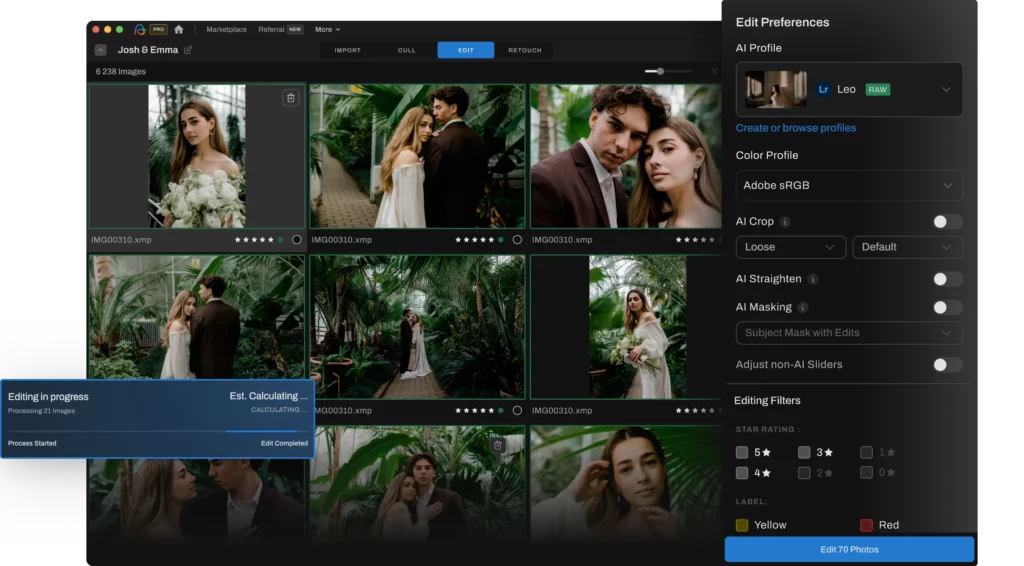
If Imagen is the efficient studio assistant, Aftershoot is the Swiss Army knife. You import a shoot, and it immediately analyzes sharpness, expressions, open eyes, duplicates, pose variations, and overall quality. Then it selects the best frames automatically so you’re not burning hours clicking through near-identical shots.
Once that’s done, you can apply your style across your gallery with your AI profile. Or you could use Instant AI profiles that help you turn your favourite Lightroom presets into AI editing profiles.
Ernesto said it exactly as most working photographers feel:
“Aftershoot is the Swiss Army knife of photography AI software.”
And in 2025, that matters. Because editing isn’t just color correction anymore. It’s culling, it’s consistency, it’s retouching, and it’s getting all of that done quickly enough to keep clients happy.
Where Aftershoot stands out
- AI culling: Picks the sharpest, best-expression frames automatically.
- AI editing that learns your style: Applies your look consistently across your gallery
- Retouching for fast portrait cleanup: Smooths skin and removes small distractions at scale.
- All-in-one workflow: Culling, editing, and retouching in one app.
- Flat pricing: Unlimited images, no per-image fees.
- Works offline: Work anywhere without relying on cloud processing.
Ernesto’s experience:
“Once it’s trained, the AI edits work fast and really well, hitting your usual white balance, contrast, shadows, highlights… without that AI look.”
Where Aftershoot still needs work
- Time required to train your editing profile.
- AI Retouching is new and evolving.
Ernesto acknowledged this:
“Like any AI, the first few jobs might need a few tweaks while it gets familiar with your style.”
Who Aftershoot is best for
- Wedding photographers
- Portrait volume shooters
- Event photographers
- Anyone delivering large galleries quickly
- Editors who want one editor for culling + editing + retouching
- Photographers who want to work from anywhere in the world
Who should skip it
- Hobbyists or low-volume shooters who don’t need automation
Imagen AI: Best for Lightroom Classic Photographers Needing Consistency
It is perfect for Lightroom Classic photographers who want fast, reliable color consistency without rebuilding their workflow. It’s the closest thing to having a digital version of yourself quietly editing in the background.
“Think of Imagen like your super-efficient photo editing assistant—quiet, fast, and extremely good at mimicking your edits once it gets to know you.”
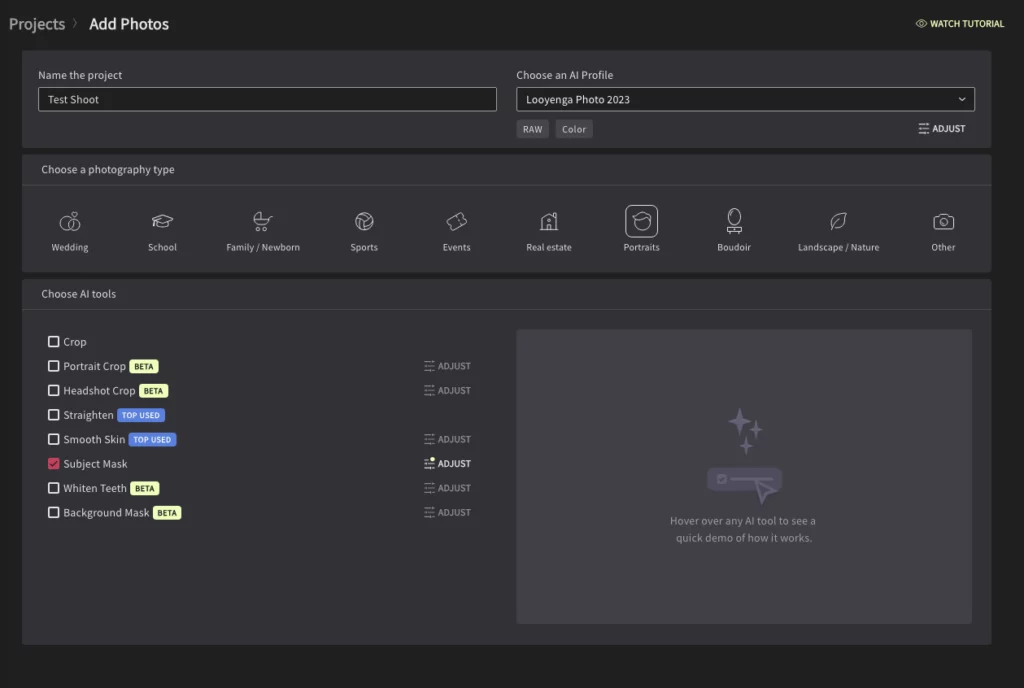
If you’ve ever wished you could clone your editing style and hand it off to someone who never gets tired, Imagen comes pretty close. It learns how you edit by analyzing a set of 2,000+ images you’ve already finished in Lightroom Classic. Every exposure correction, every subtle white balance shift, every tone curve you apply is mimicked to create your AI profile.
Once your profile is trained, Imagen applies your look automatically to new shoots all within Lightroom Classic, so there’s no need to switch platforms.
“It’s like having a robot version of yourself that doesn’t need coffee or complain about back pain.”
For wedding and portrait photographers, that’s huge. Imagen’s color consistency, especially with skin tones, is genuinely impressive. Most users report that 70–90% of the edits look “done enough” to move on to final tweaks immediately.
Where Imagen AI shines
- Consistency across big galleries: Ideal for weddings, events, and portrait volume work.
- Native Lightroom Classic workflow: Zero friction.
- Fast cloud processing: Edits come back while you make coffee.
Where Imagen falls short
Even the best AI has limits, and Imagen’s show up mainly in workflow flexibility.
- Cloud-only: No offline working. Not ideal for travel or destination photographers.
- Per-image pricing: Seems fine… until you send a 1,200-image wedding.
- Lightroom Classic only: Capture One, Lightroom Desktop, and other workflows aren’t supported.
“It charges per image… which sounds fine until you realize your 1200-photo wedding gallery just cost you the price of a nice dinner.”
Who Imagen AI is best for
- Wedding and portrait photographers with a strong, consistent editing style
- Lightroom Classic loyalists
- Editors who have a predictable number of images
Who should skip it
- Photographers who need culling + editing + retouching in one place
- Anyone with unreliable or slow internet
- High-volume shooters who want flat, predictable pricing
Choosing between Aftershoot and Imagen? This in-depth comparison shows which one fits your workflow.
Luminar Neo: Best for Stylized and Creative AI Edits
Luminar Neo is the tool you reach for when you want dramatic, stylized, punchy edits. It’s the creative option in this lineup, built for photographers who want visual flair without the Photoshop learning curve.
While Imagen and Aftershoot focus on matching your style or streamlining workflows, Luminar Neo does something different: it gives you artistic control in a handful of sliders. Sky replacements, portrait bokeh simulation, skin smoothing, structure adjustments, color pop—it’s all right there, and it’s all powered by AI.
Ernesto summed up the vibe perfectly:
“Luminar Neo is the dramatic one. The vibe is: make it pop, make it fun, make it fast.”
If you’re shooting travel, editorial, creative portraits, or anything where mood and punch matter more than consistency across 700 images, Luminar is an easy yes.
Where Luminar Neo shines
- Dramatic edits in seconds: Sky Replacement AI, Portrait Bokeh AI, Skin AI, etc
- Standalone App: No Lightroom needed
- One-time license option: If you’re tired of subscriptions, or you edit only a handful of images
Where Luminar Neo falls short
- Not designed for volume
- No AI culling or editing
- Occasional bugs
- Increased load time on slower machines
Ernesto mentions what many forums have echoed:
“Some updates introduce little glitches, and on slower machines, you might even be looking at crashes.”
Who Luminar Neo is best for
- Travel and landscape photographers
- Creative portrait shooters
- Social media content creators
- Photographers who want punchy, stylized edits quickly
- Anyone who wants powerful effects without Photoshop’s learning curve
Who should skip it
- Wedding and event photographers
- Volume shooters
- Photographers who need culling + editing + retouching in one place
- Editors needing fast batch processing speeds
How to choose the best AI photo editing tool for your workflow
If there’s one thing Ernesto’s review makes clear, it’s this: AI isn’t here to replace photographers. AI editing tools have become an essential part of a photographer’s workflow. In our photography industry report 2025, 81% of respondents have finally found work-life balance because of it.
The tools have finally matured enough that you can trust them with the groundwork and still keep full control over the creative decisions your clients actually notice.
Ernesto’s closing line is the one most photographers need to hear right now:
“AI won’t replace you, but it will replace the hours you spend clicking the same Lightroom slider over and over.”
And that’s the real win!
If you want to see what a fully AI-assisted workflow feels like on your own images, try running your next shoot through Aftershoot’s free trial. It’s the easiest way to understand how much time you can actually save.
FAQ about AI photo editing tools (2026)
1. Is AI editing safe for client work?
Yes. AI handles the repetitive groundwork exposure, white balance, tone consistency, and basic retouching while you maintain full creative control. Think of it as a very fast assistant.
2. Will AI ruin my editing style or make my images look generic?
Not if you choose the right tool. Imagen and Aftershoot both learn your editing style from past galleries, so the output matches your look. Luminar Neo is more stylized, but that’s by design for creative edits.
3. Do I lose creative control when using AI editors?
No. You can override, tweak, or completely re-edit anything the AI does. Most photographers treat AI results as a polished base layer and then add their final touches.
4. Which AI editor works without the internet?
Aftershoot is the only tool in this lineup that works fully offline: culling, editing, and retouching included.
Imagen AI requires internet (cloud processing), and Luminar Neo requires internet only for installation/updates.
5. Which AI tool is best for wedding photographers?
It depends on your bottleneck:
Need culling, editing, and retouching done on unlimited images→ Aftershoot
Need culling and editing done on limited images → Imagen AI
Want stylized looks for hero portraits → Luminar Neo
Most full-time photographers Ernesto works with use either Aftershoot alone or Aftershoot + Imagen, depending on their needs.
6. Can AI editing replace manual retouching?
Not fully. Aftershoot’s new AI retouching handles skin smoothing, blemish removal, and basic cleanup, which is perfect for large galleries. But for high-end beauty work, fine art portraits, or commercial retouching, you’ll still want Photoshop-level tools.
7. What’s the most affordable AI editor?
Luminar Neo wins for one-time purchase pricing.
Aftershoot wins for unlimited volume because there are no per-image fees.
Imagen gets expensive at volume due to per-image pricing.
8. Do AI editors work with RAW files?
Yes, all three tools in this guide support RAW files.